01Always one shortcut away
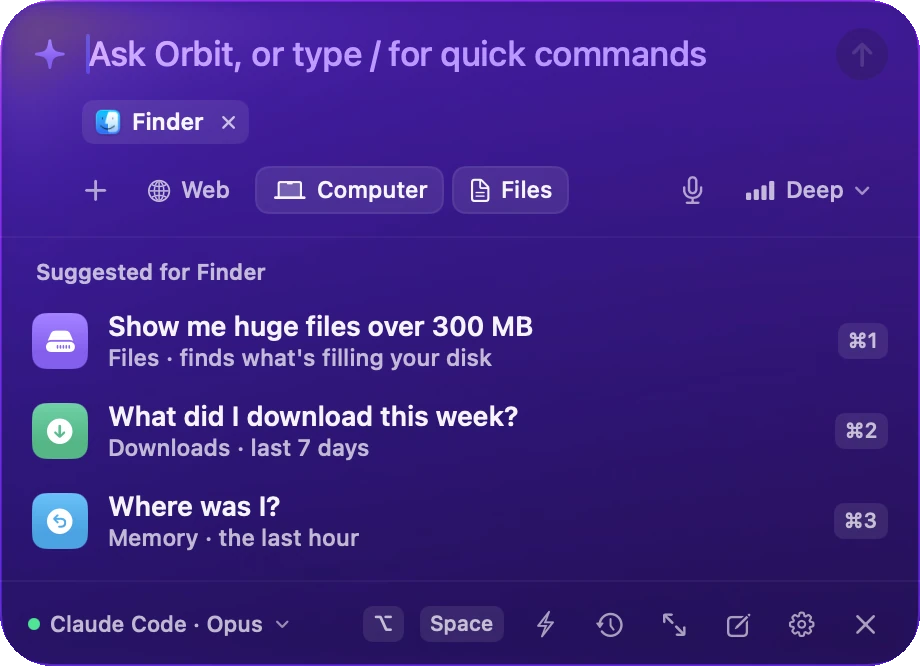
It knows what you're in.
Press ⌥ Space in any app. Orbix sees the app and window in front, and suggests what you'd want next.
Orbix
Everything you do.In orbit.
The AI in your menu bar that remembers what you've seen, does the work with Undo, and keeps your day, your health and your money in view — privately, on your Mac.
Memory
It remembers.
So you don't have to.
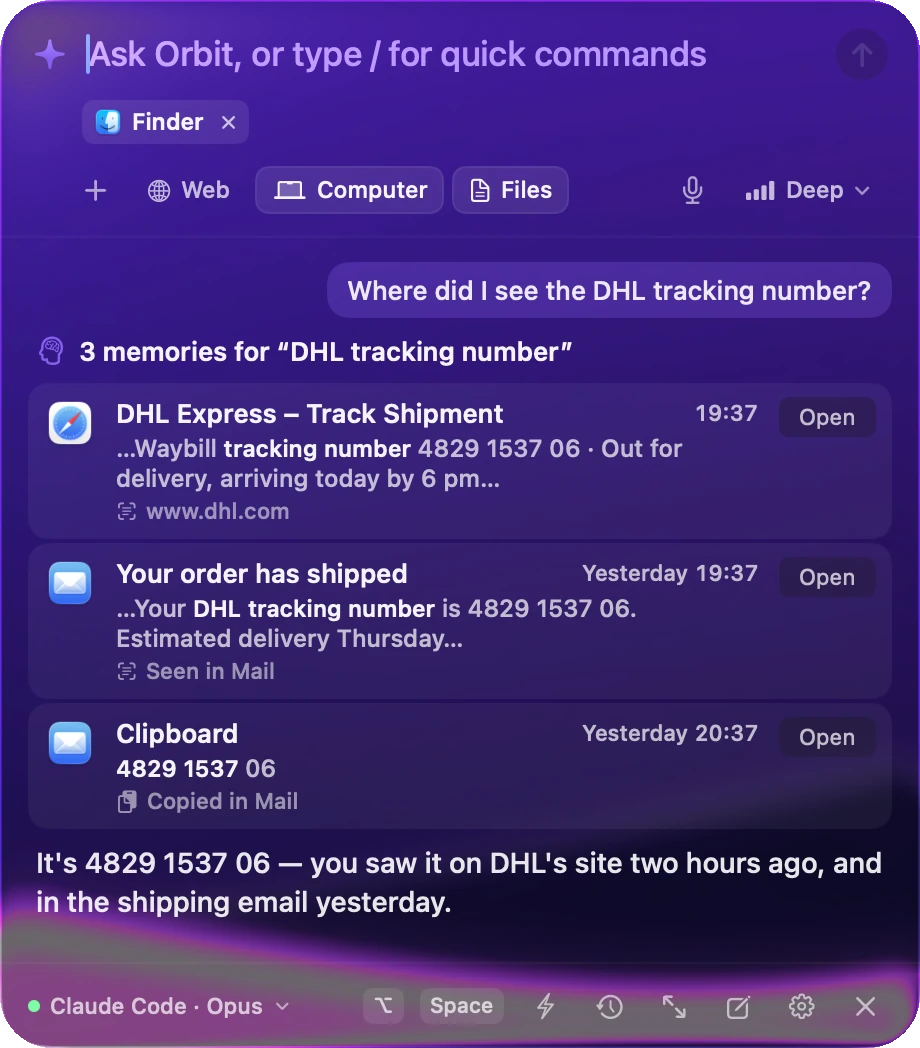
Orbix quietly keeps a private memory of what you see and do on your Mac. Ask in your own words — it answers with the moment, the app and the exact line.

Ask Orbix…
⌥ Space01 / Screen text
Anything you've seen, one question away.
Every few seconds, while your screen changes, Orbix reads the text in the front window with Apple's on-device Vision. It keeps the words — never the picture — so a tracking number, a price or a line from a call is always findable.
How screen memory works02 / Timeline
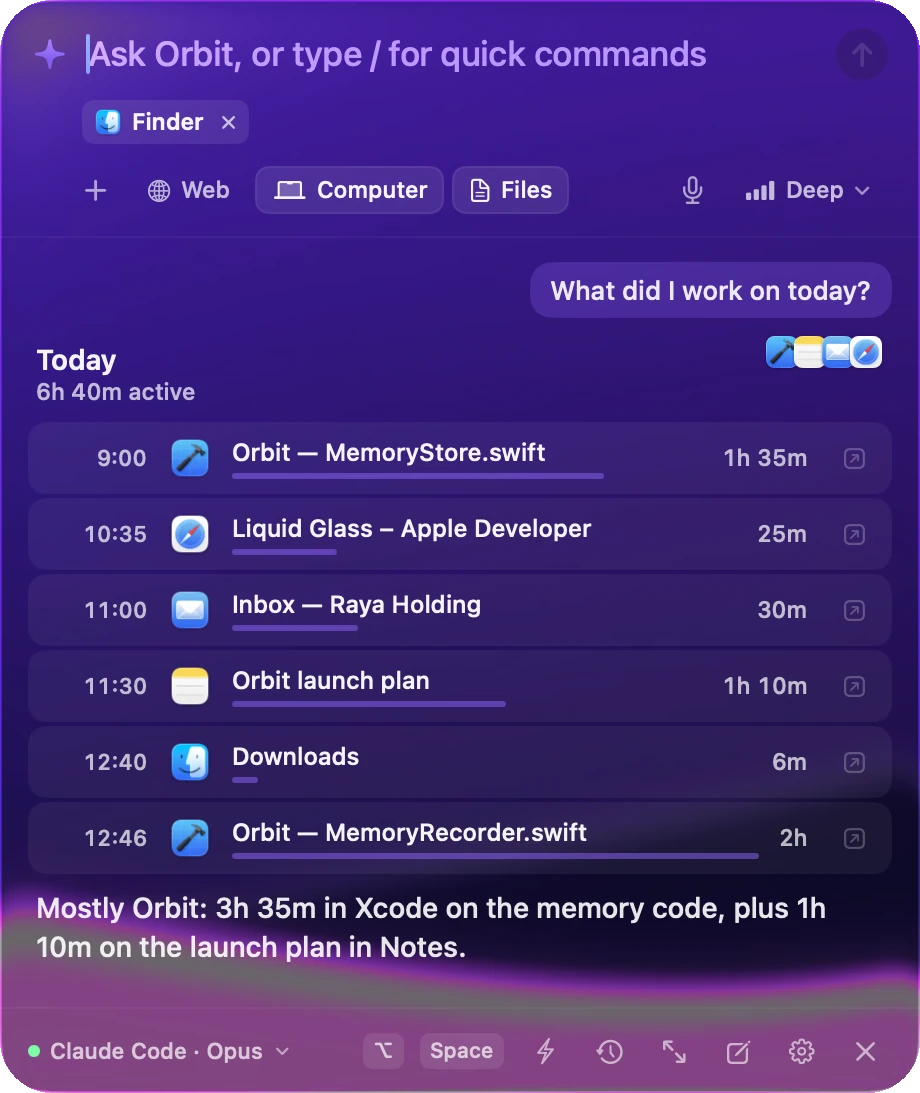
Your day, rebuilt from memory.
Each app, window, document and web page you use becomes a session with a start and an end. Ask what you did on Tuesday, see how long things took, and reopen everything from that moment with one click.
Ask about your time03 / People & projects
Who you met. What you promised.
Orbix groups your work into projects from your repos and folders, and connects people across Mail, Calendar and Messages — including the things you said you'd do.
See projects and peopleMaya Chen
Producer · 14 conversations
You promised
“I'll send you the final cut by Friday.”
Due in 2 days · from Mail
Text, never images
Screenshots are read and thrown away. Only words are kept.
Skips what's private
Password managers, private windows and secure fields are never read.
Pause or forget
Stop recording in a click. Forget the last hour, a day or an app.
Stays on your Mac
No Orbix server, no account. Your memory is a file only you can read.
Your day
Good morning.
It's all planned.
Unlock your Mac and your day is ready: meetings with their links, the free time between them, what's due, the mail worth reading — and a workout that fits how you slept.
Your schedule, with room to breathe
Every meeting with its Zoom, Meet or Teams link, and the free stretches between them.
How you slept, what it means
Sleep, HRV and resting heart rate against your own normal — from WHOOP, Fitbit or your Apple Watch.
A workout that fits
Yoga after a short night, a run on a good one, in a free slot. Accept it three times and Orbix plans it for you.
Mail and promises
Who wrote, and the things you said you'd do — “I'll send it by Friday” — so nothing slips.
Your Day
The day so far, in one card.
One click on the sun: focus time and what broke it, the projects your hours went to, steps and strain, your workout — and the subscriptions you'll pay this week.
Health
Your health,
finally in one place.
Recovery, sleep, heart and every blood test you've had — side by side, compared over time, and read entirely on your Mac.
This morning
How ready you are, from your WHOOP.
Recovery, sleep, HRV and resting heart rate — against your own normal, not an average.
Today
WHOOP82%
Recovery
Ready to push
From your WHOOP recovery. You slept 7 h 54 — 50 min more than usual.
Sleep
7 h 54
usual 7 h 04
HRV
67ms
usual 60 ms
Resting HR
52bpm
usual 55 bpm
This morning
How ready you are, from your WHOOP.
Recovery, sleep, HRV and resting heart rate — against your own normal, not an average.
Today
WHOOP82%
Recovery
Ready to push
From your WHOOP recovery. You slept 7 h 54 — 50 min more than usual.
Sleep
7 h 54
usual 7 h 04
HRV
67ms
usual 60 ms
Resting HR
52bpm
usual 55 bpm
Blood work
Every blood test, read for you.
Drop in a PDF or a photo. Each value is read on your Mac, placed in its range and compared with your last test.
Blood work
Oct 2, 2026 · 2 reports11
of 13
2 to keep an eye on
11 of 13 markers in range on your latest test.
3 better than the test before
LDL cholesterol
Range < 100
121mg/dL
Total cholesterol
Range < 200
201mg/dL
HDL cholesterol
Range > 40
51mg/dL
Triglycerides
Range < 150
128mg/dL
Vitamin D
Range 30–100
34ng/mL
HbA1c
Range < 5.7
5.4%
LDL cholesterol · your last two tests
▼ 18% since March
LDL down 18% since March, vitamin D back in range — side by side with how you sleep and recover.
Blood tests, read for you
Drop a PDF or a photo — in English or Italian. Every value, unit and range, and reports in Downloads are noticed on their own.
Every wearable
WHOOP and Fitbit connect directly. Apple Watch, Oura and Garmin come in through the iPhone's Health app.
A coach that knows your week
Readiness from your sleep and heart, a session in a free slot, and it learns what you actually do.
Yours alone
Health data stays on your Mac — and it's never shared with your other AI apps.
Food
Snap your plate.
Know what's on it.
Drop a photo of what you ate. Your AI names every food, estimates each portion, and logs calories, protein, carbs, fat, fiber, sugar and salt — next to your blood work and recovery.
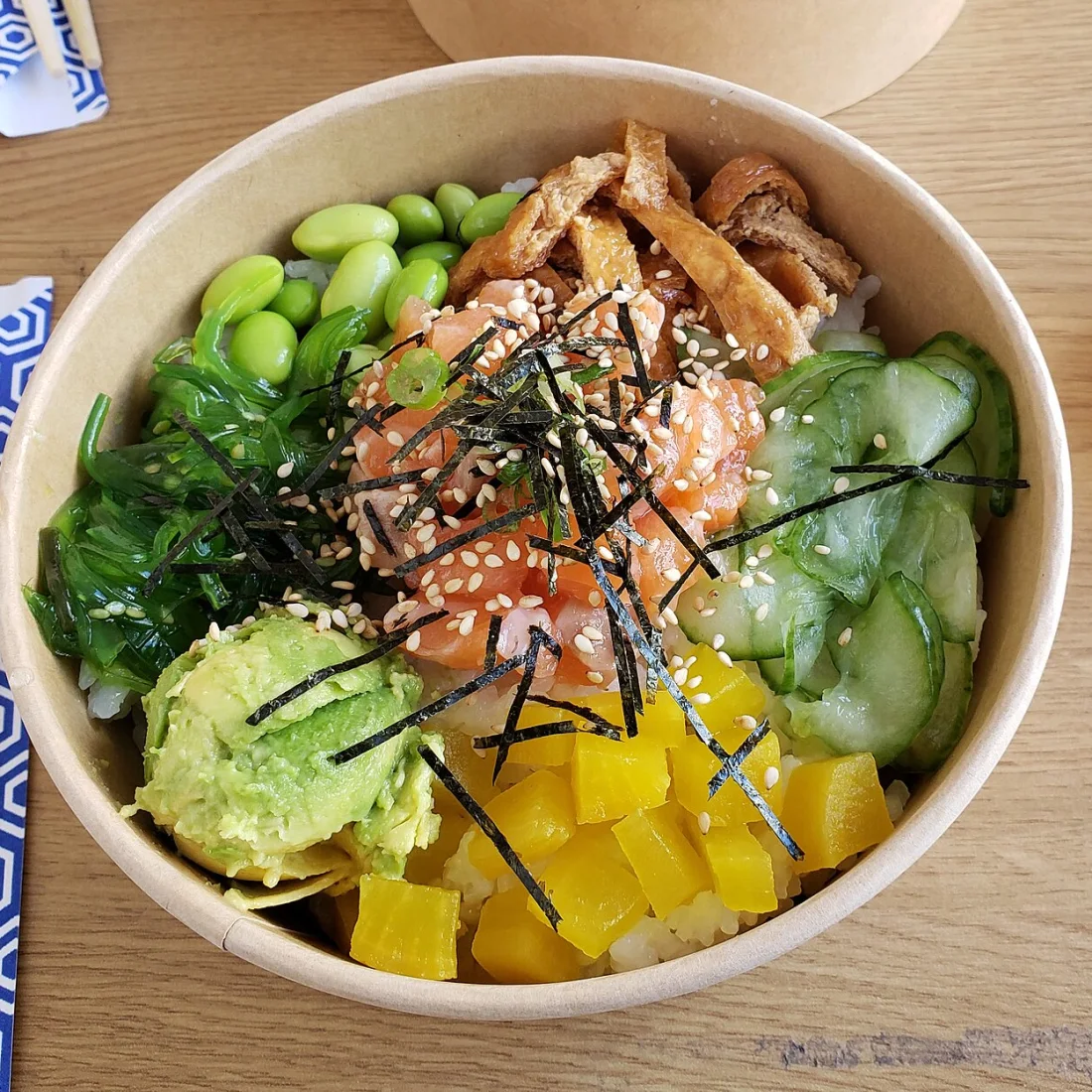
Salmon poke bowl
Dinner · 19:40
0
kcal
Protein
0 g
Carbs
0 g
Fat
0 g
Salmon 90 g187 kcal
Edamame 40 g48 kcal
Fried tofu 30 g80 kcal
Wakame 50 g35 kcal
Cucumber 50 g15 kcal
Avocado 50 g80 kcal
+ 2 more · fiber 10 g · sugar 18 g · salt 3.1 g
✦The salt is high for one meal — mostly the pickles and soy. 54 g of protein still to go today; after 7.9 h of sleep, you're ready to train.
Every food, by name
Not a guess for the plate — each ingredient and its portion, so you can correct one.
Against your goals
Calories and protein for the day, from your weight and how often you train.
Tied to your health
LDL high? It watches saturated fat. Low recovery? Protein and carbs to rebuild.
Yours alone
Meals and photos stay on your Mac, never offered to your other AI apps.
100+
native actions across files, apps, settings, mail, health, money and the web
5
ways to bring your AI — Claude, ChatGPT, API keys or local models
0
servers. Your memory never leaves your Mac.
⌘Z
undoes what Orbix did — even after a restart
Does more.
Always asks first.
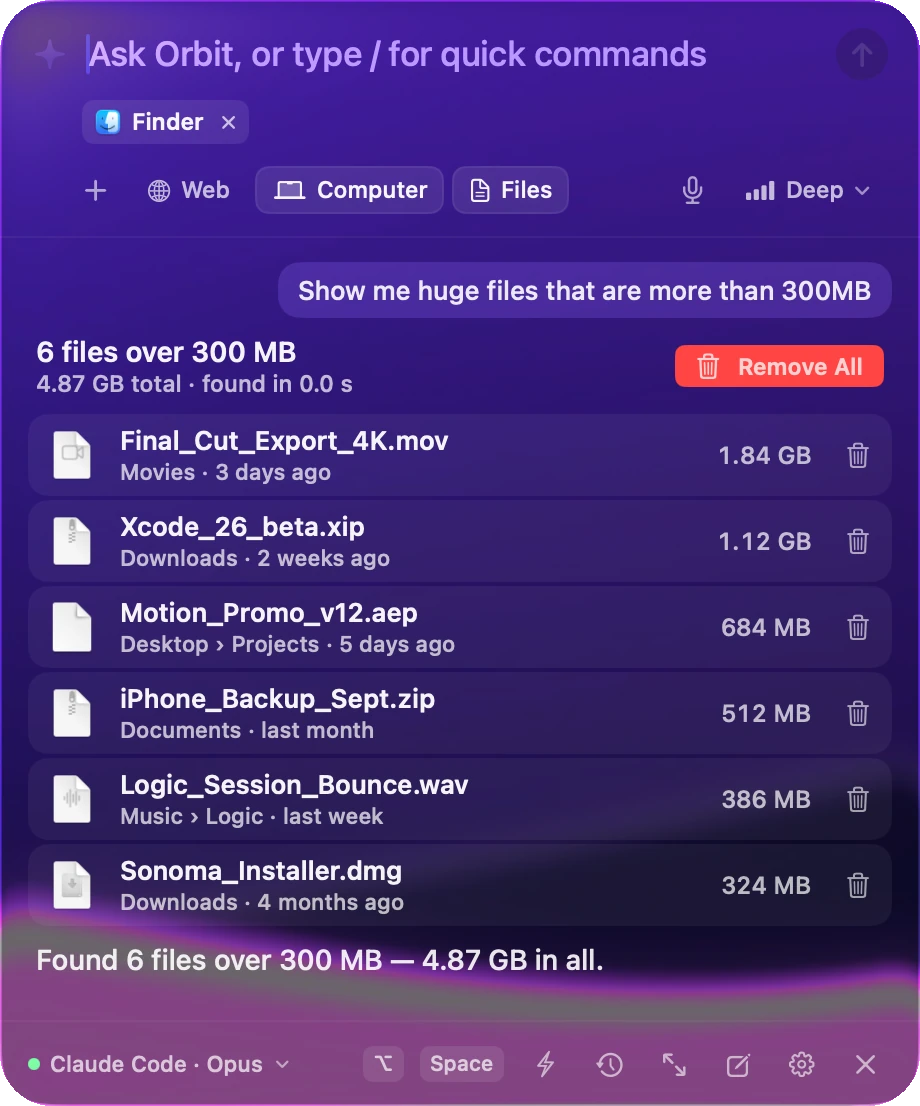
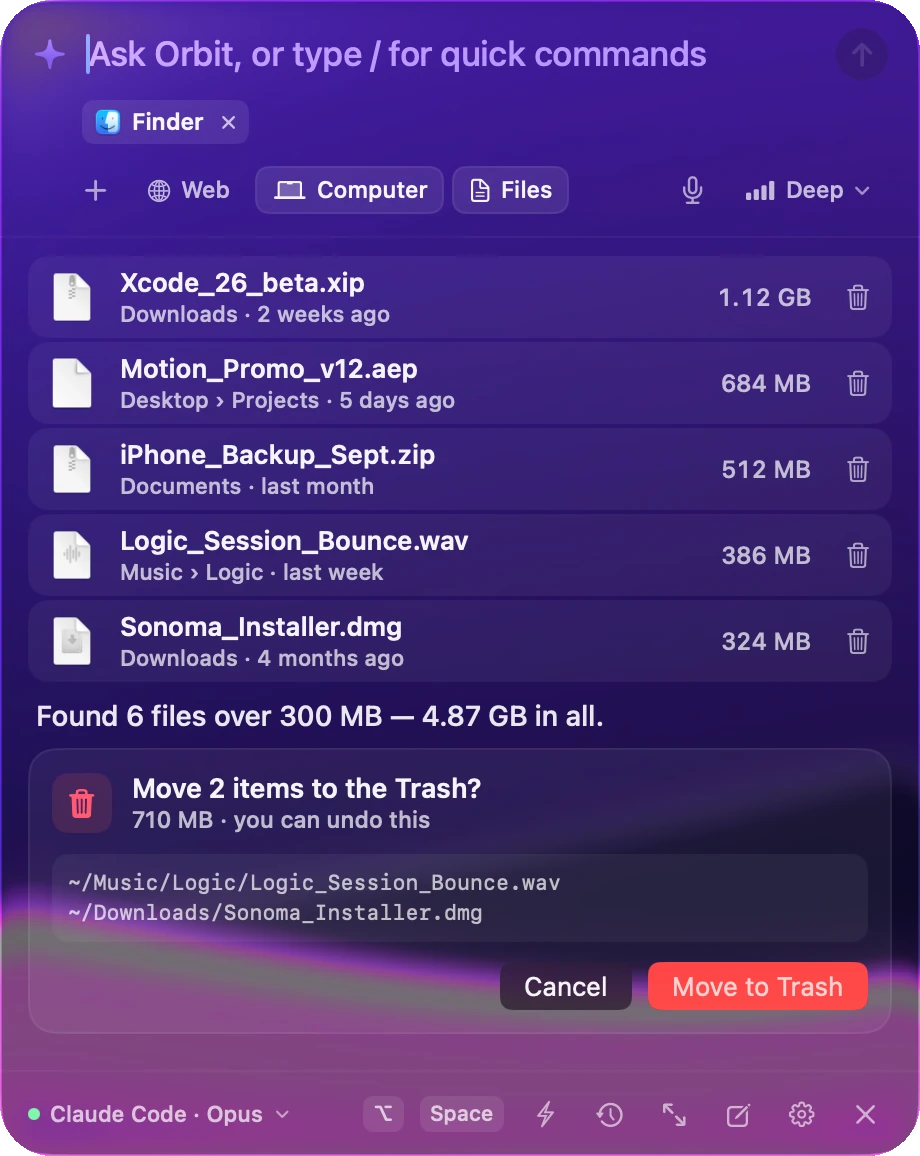
More than 100 native actions across your files, apps, settings, calendar, mail and the web — each one fast, undoable, and shown to you before it changes anything.
Asks before every change.
Anything that moves, renames, sends, quits or runs something shows you exactly what will happen, and waits.

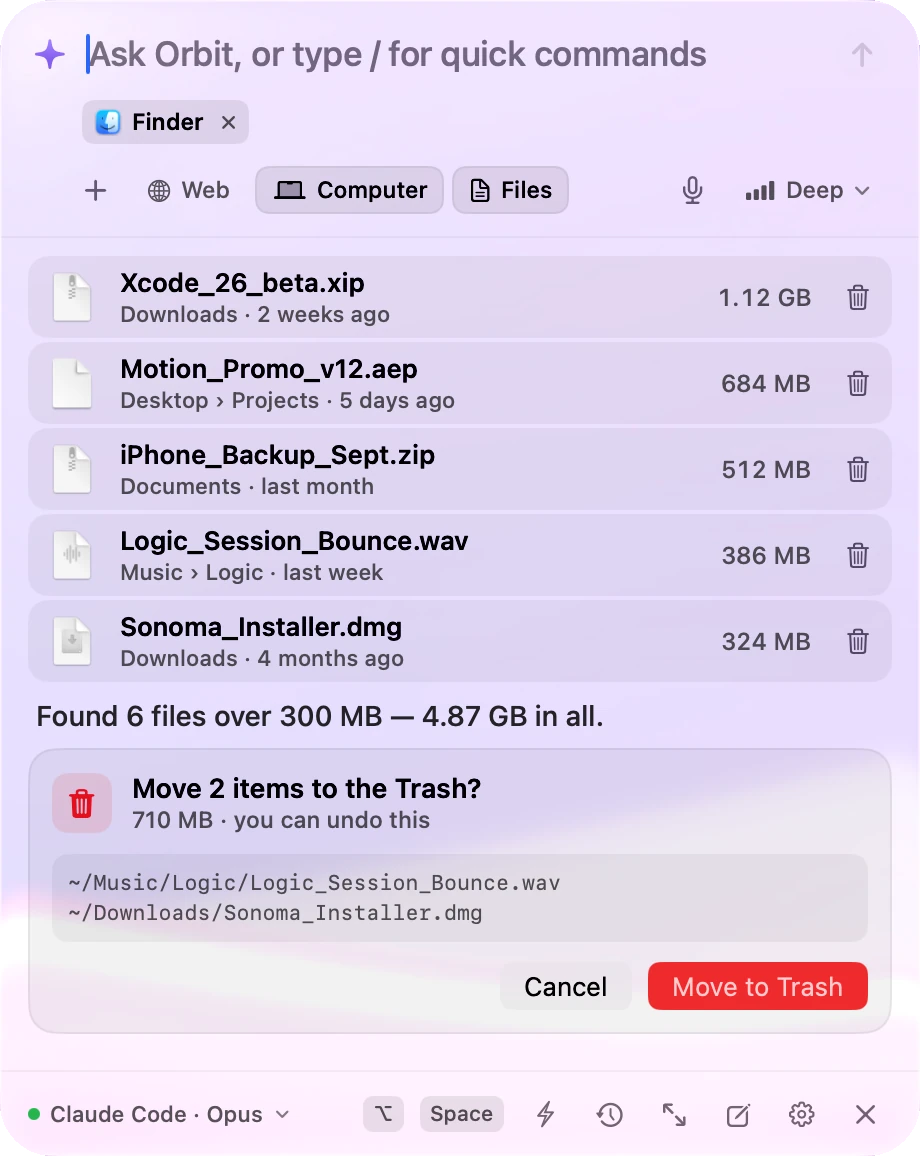
Undo anything.
Even later.
Trash moves, renames, organizing and new files can all be put back — even after a restart. Nothing is ever deleted for good.
Your Mac, on command.
Dark mode, volume, Wi-Fi, apps, windows, workspaces, Shortcuts and health — just say it.
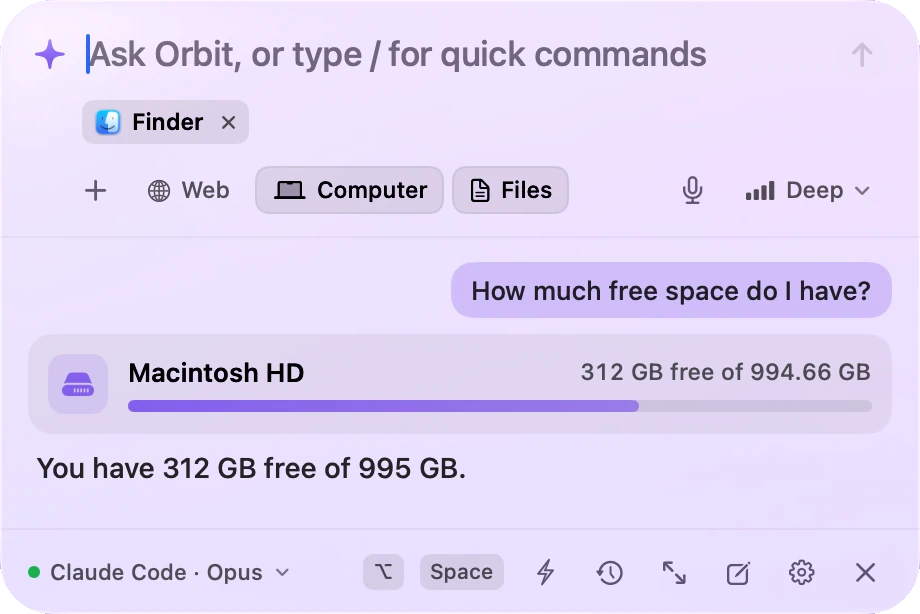
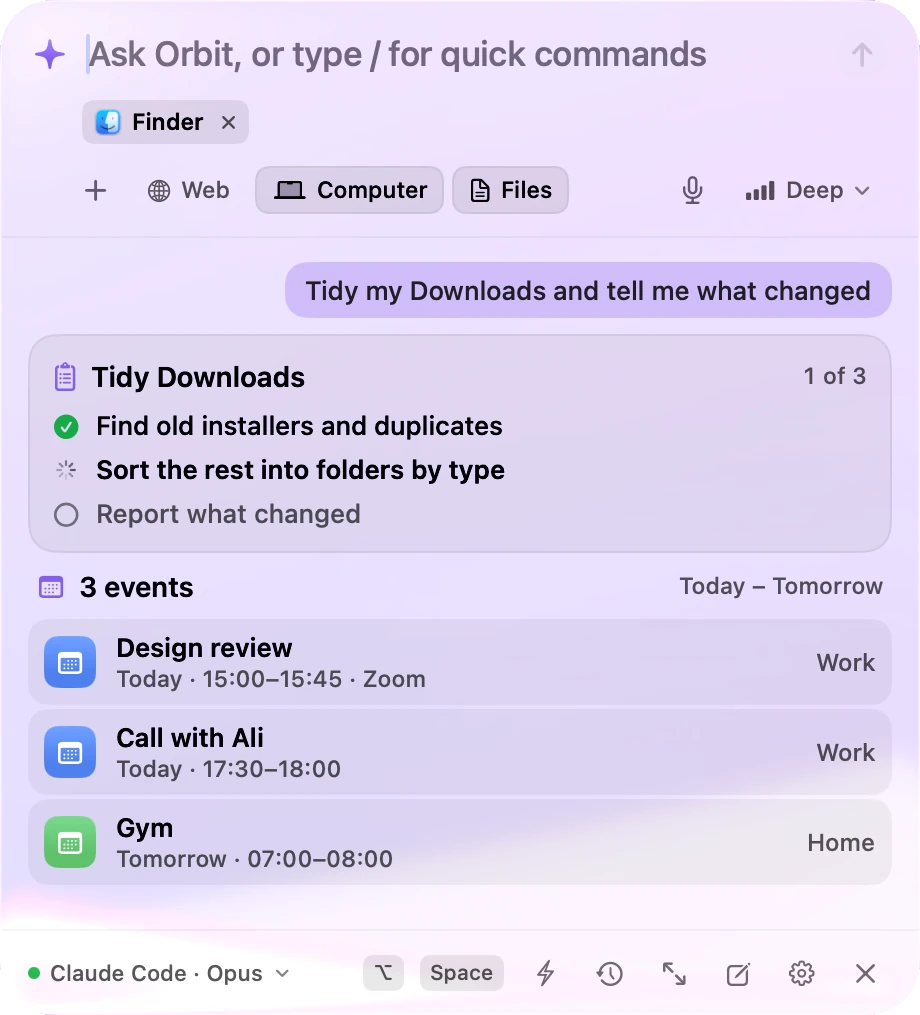
Calendar, Mail, Notes and Music.
Find free time, add events and reminders, summarize unread mail and draft replies. Orbix never sends anything on its own.
Money & documents
Where did the money go?
When does it run out?
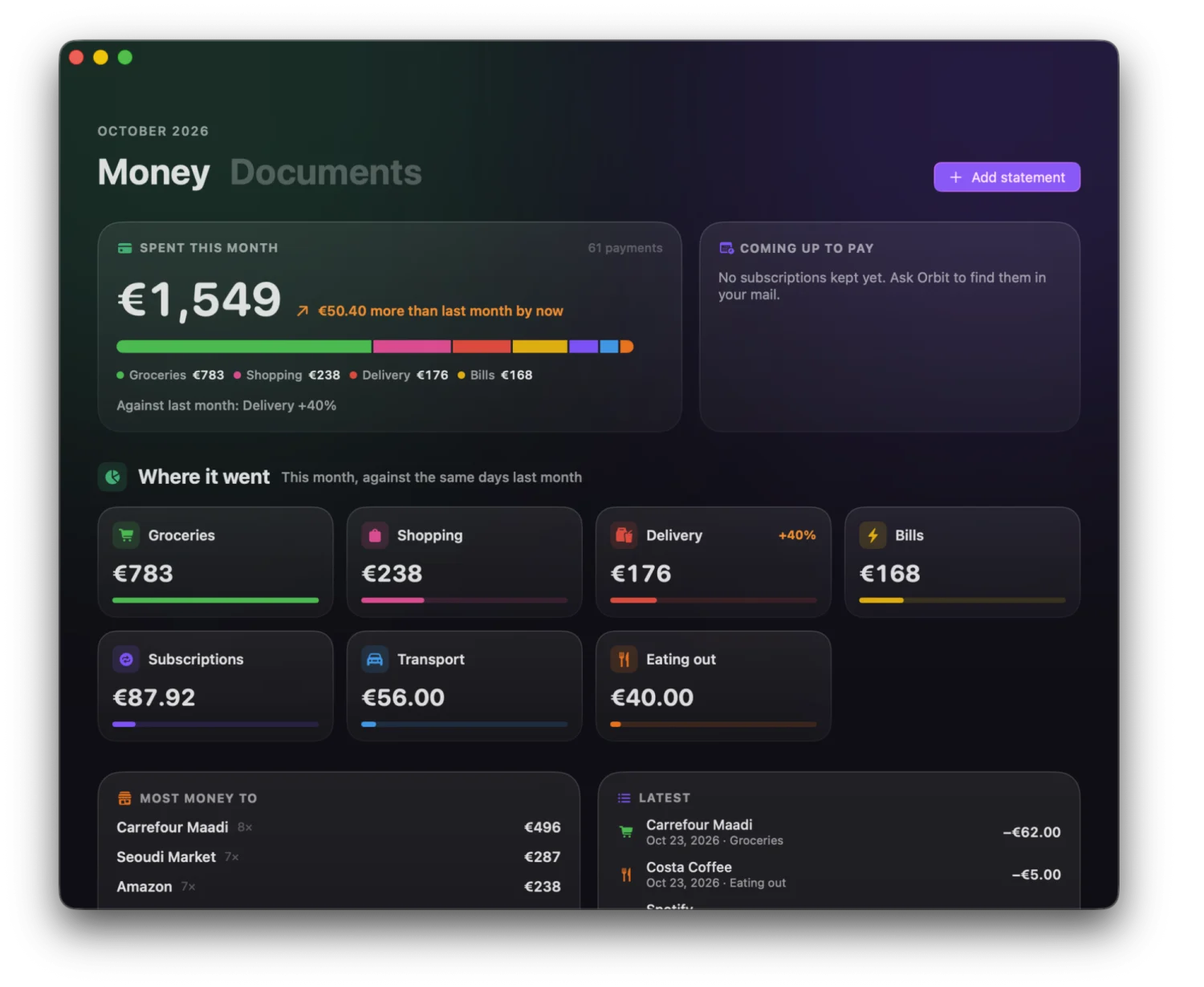
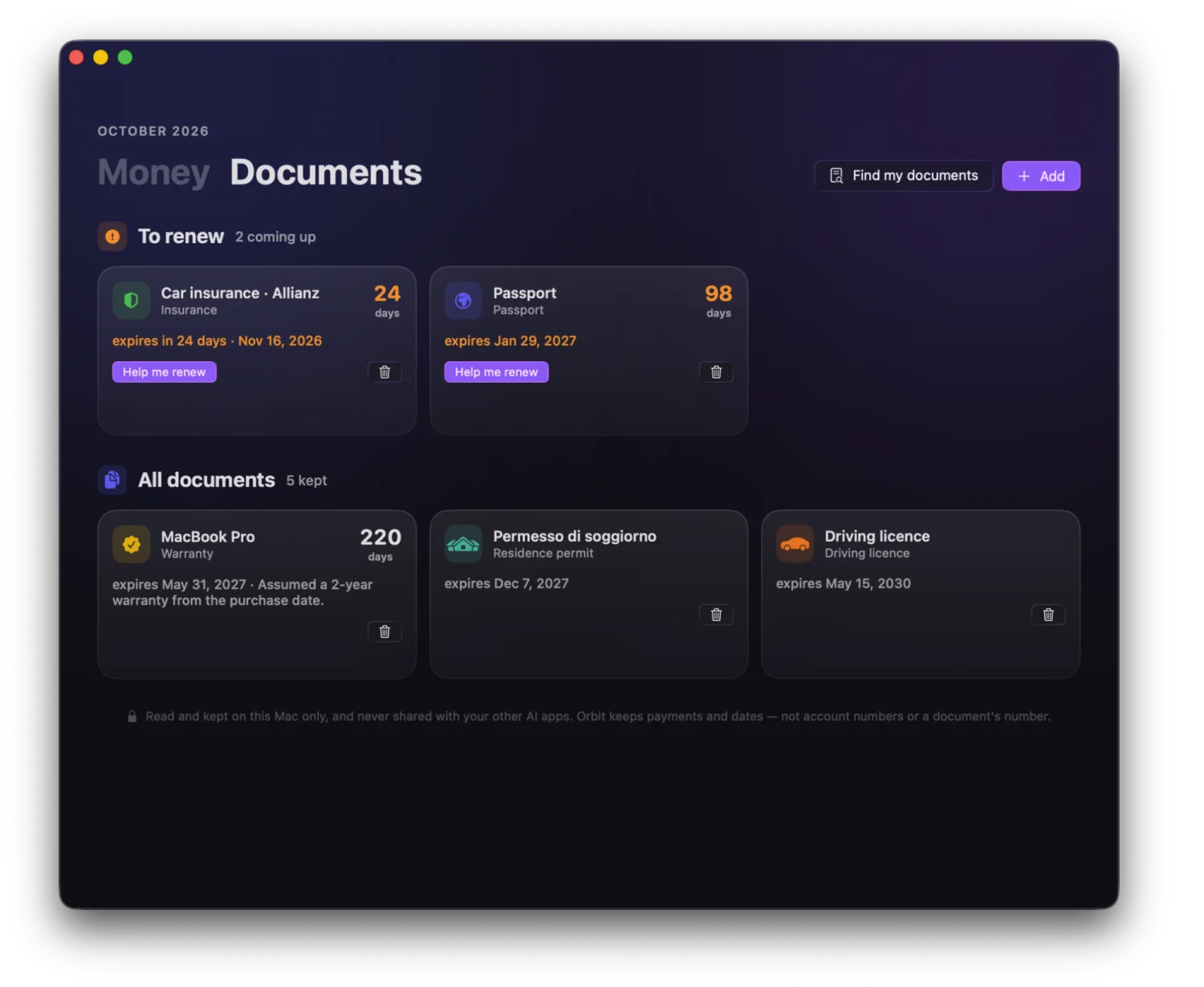
Your spending from your own statements, and every document with a date to keep an eye on — answered, and remembered, on your Mac.
Statements & receipts
A CSV or PDF from your bank, a scan, a receipt photo — read on your Mac. No bank login.
Where it went
Every payment sorted: groceries, delivery, transport, bills, subscriptions.
What changed
This month against the same days last month — “Delivery +40%” — and your top merchants.
Voice
Snap. Speak.
Done.
Snap your fingers twice and Orbix says hello and listens. Or hold ⌥Space and talk. It sends when you stop — and answers out loud.
Hands-free
Double-snap from across the room.
Talks back
Answers you asked aloud are read aloud.
On-device speech
Your voice is turned into words on your Mac.
No button to release
It hears when you're done.
Automations
Set it once.
It runs forever.
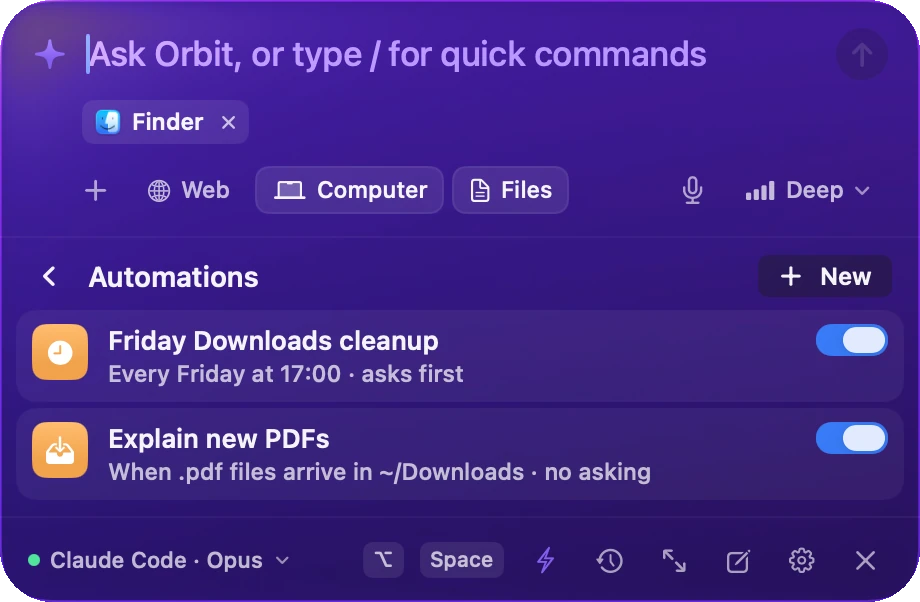
Describe a routine in plain words — “every Friday at 5 pm, clean installers out of Downloads” — or tie it to a moment: arriving at the office, unlocking your Mac, plugging in headphones. Orbix runs it in the background, asking before any change.
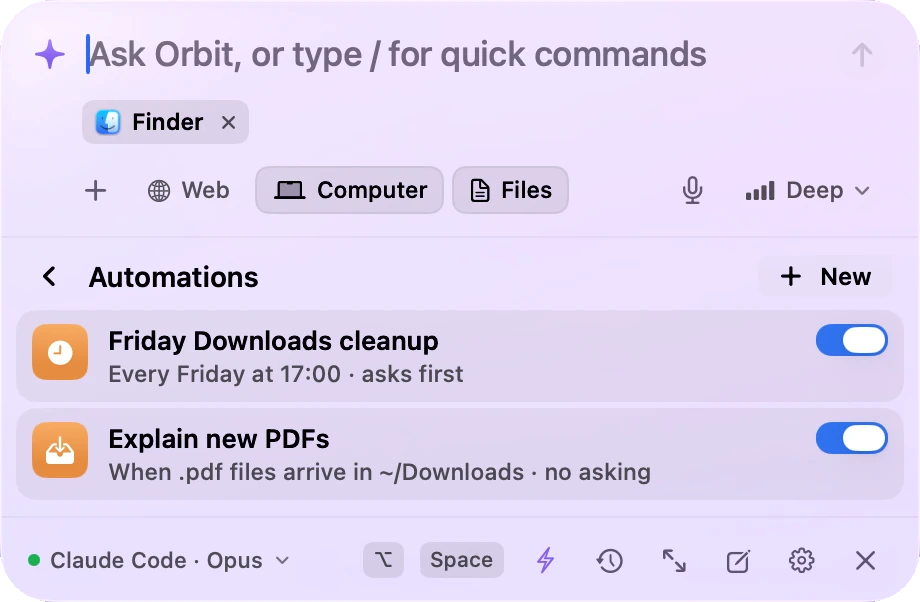
On a schedule
When files arrive
When you join Wi-Fi
When you unlock
Before meetings
Headphones on
Modes
One word. Everything set.
“Work mode” opens your apps, turns on Dark Mode and Focus, and pauses the music. Modes run instantly — no AI in between — and one Undo puts it all back.
Tie one to a moment: join the office Wi-Fi and you're in Work mode; lock the screen and the music stops.
Works in every app
Select. Ask.
Done.
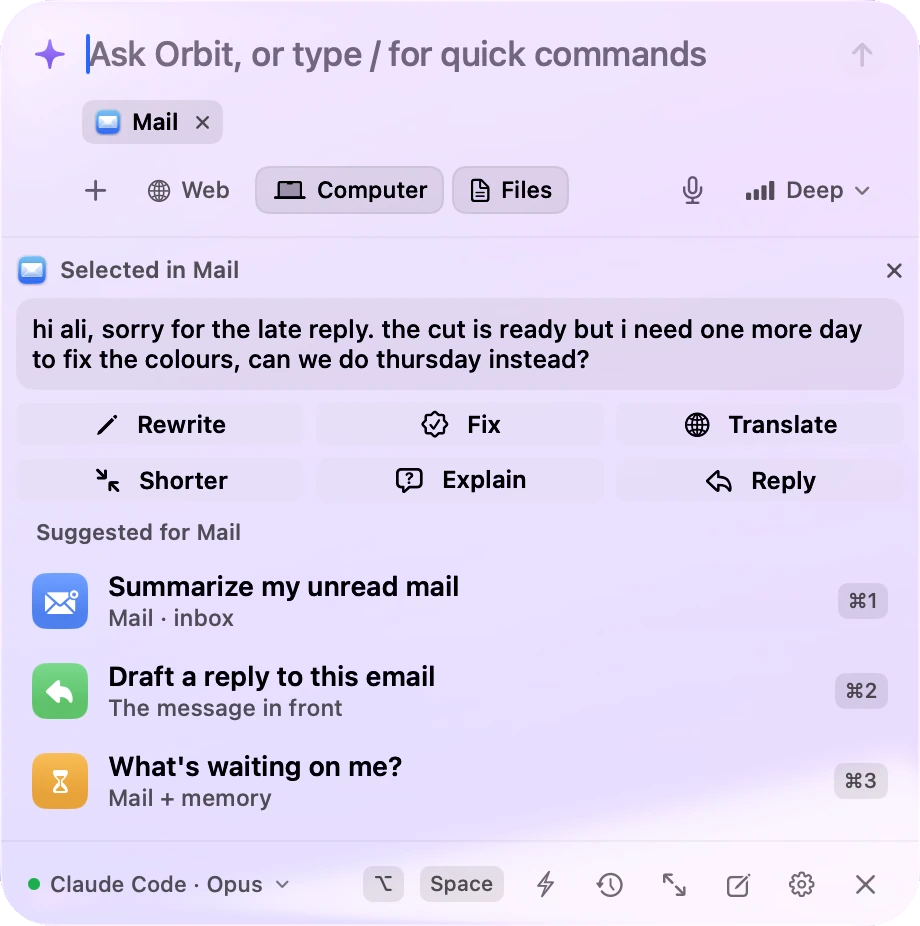
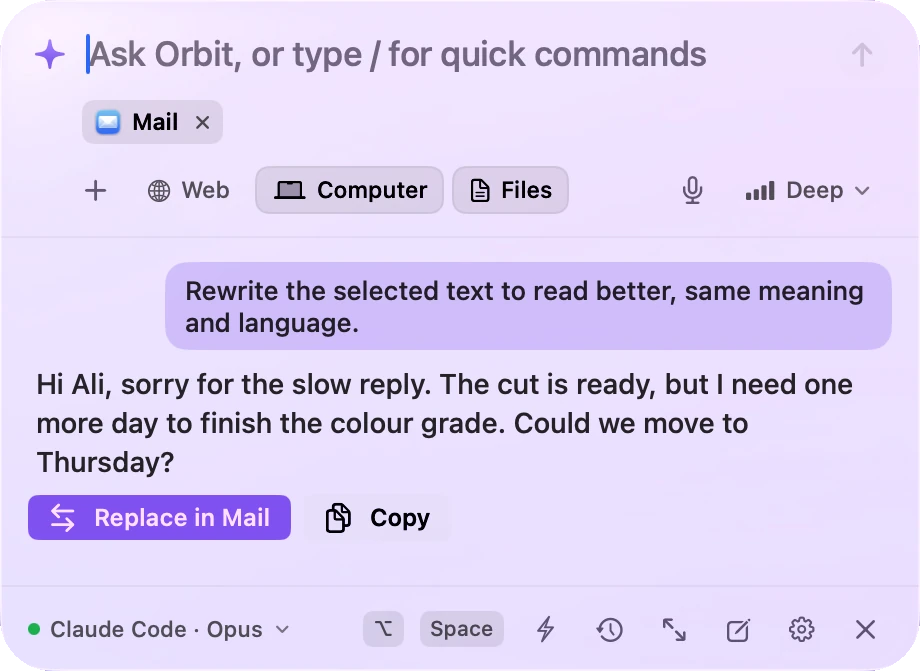
Select text in any app and press ⌥⇧Space. Rewrite an email, fix a sentence, translate a message or draft a reply — then put the result right back.
Memory for every AI
Your memory,
in every AI you use.
Connect Claude Code, Cursor or Claude Desktop, and they can look up what you saw and worked on. Read-only, every lookup logged, your health never shared.
› what was the error on gateway-prod-02 last night?
⏺ orbit-memory · memory_search “gateway-prod-02 error”
⎿ Chrome · Kibana Discover · 03:14 — 502 Bad Gateway, upstream timeout
A 502 from an upstream timeout at 03:14. It started right after the 03:10 deploy — want me to look at that commit?
Everything Orbix does.
One assistant for your memory, your work, your day and your body.
Remembers
Screen memory
Find anything you've seen, by its words.
Timeline
Every app, page and file, with times.
Projects & people
Who you met, what you promised.
Clipboard & files
Every copy; where each download came from.
Meeting notes
What was said, kept as text.
Does
100+ actions
Files, apps, windows, settings and the web.
Calendar & mail
Find time, add events, draft replies.
Agent tasks
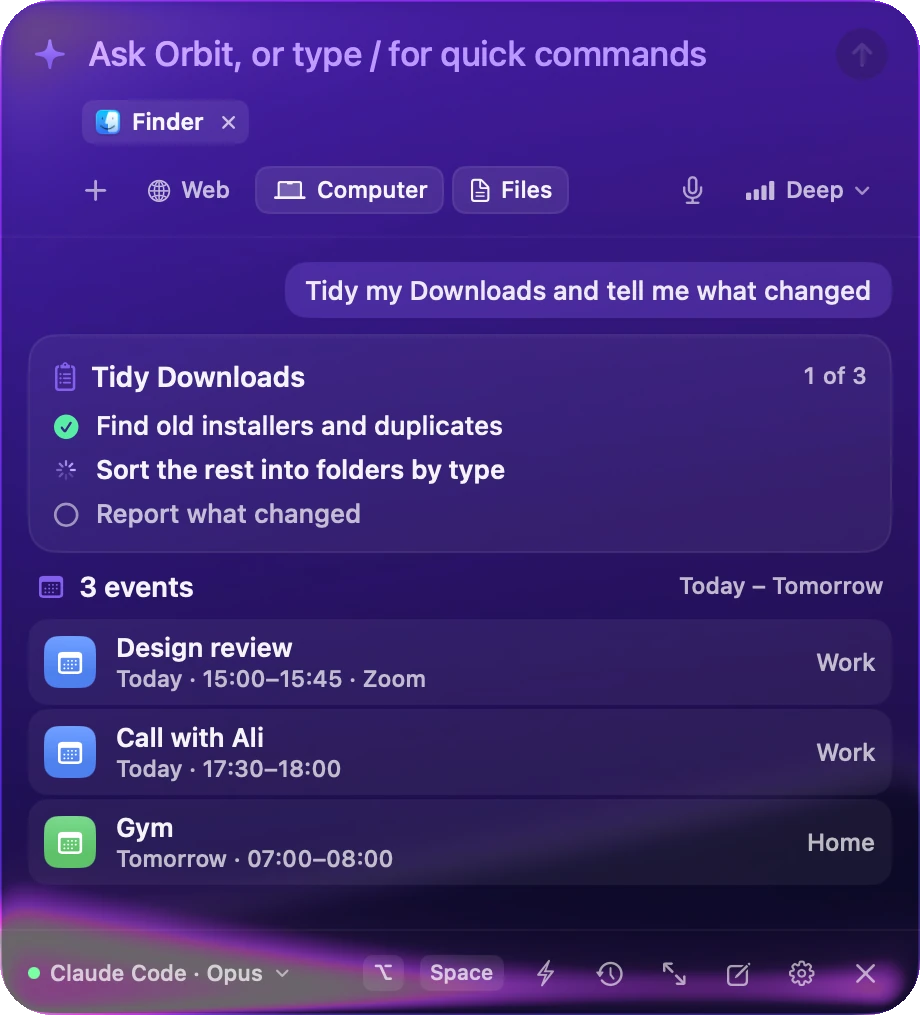
Plans big jobs and shows each step.
Autopilot
Does it, then tells you — with Undo.
Undo everything
⌘Z, even after a restart.
Plans your day
Morning brief
Opens on its own after you unlock.
Your Day
Focus, projects, body and bills.
Evening wind-down
Tomorrow, and a bedtime that fits it.
Workouts that fit
From your sleep, in a free slot.
Focus sessions
A nudge when you drift.
Health & food
Blood tests
PDFs and photos, read on your Mac.
Food from a photo
Every food, its calories and protein.
WHOOP & Fitbit
Recovery, sleep and strain.
Apple Health
Apple Watch, Oura, Garmin and more.
Coach
Readiness and what to do about it.
Money & papers
Spending
From your own statements, by category.
Receipts
A photo, and it's in.
Subscriptions
What you'll pay, before you pay it.
Documents
Passports, IDs, insurance, warranties.
Renewals
Months ahead, when it takes weeks.
Runs on its own
Automations
On a schedule or when files arrive.
Context triggers
Wi-Fi, unlock, displays, headphones, power.
Modes
Work, meeting, night — one word.
Snap to talk
Two snaps and it's listening.
Memory for your AIs
Claude Code, Cursor, Claude Desktop.
Private by design.
An assistant that sees your screen has to earn your trust. Only what's needed to answer your question goes to the AI you chose.
On your Mac.
Your memory is stored on your Mac, readable only by your account. There's no Orbix server and no account.
Xcode
1Password
skipped
Safari
Private · skipped
Locked
skipped
Never recorded.
Password managers, password fields, private browser windows, a locked screen — and any app you choose.
OPENAI_API_KEY=sk-proj-8fQ2xLm4••••••••••••••••
password:Sunset-1987!••••••••••••
BearereyJhbGciOiJIUzI•••••••••••••••
Kept in memory as •••• — never the value.
Secrets stay secret.
Passwords, API keys and tokens — on screen or copied — are blanked out before anything is kept.
You decide.
Pause anytime. Forget the last hour, a day or an app. Choose how long memories are kept.
Bring the AI
you already use.
Orbix doesn't need another subscription. It gives the AI you have its tools and its memory of your Mac.
Made for you
A minute to set up.
Then it fits you.
Tell Orbix about your work, your days and what matters to you — focus, inbox, time, health, money. Your brief, its suggestions and its tone follow.
The evening
Good night.
Tomorrow's ready.
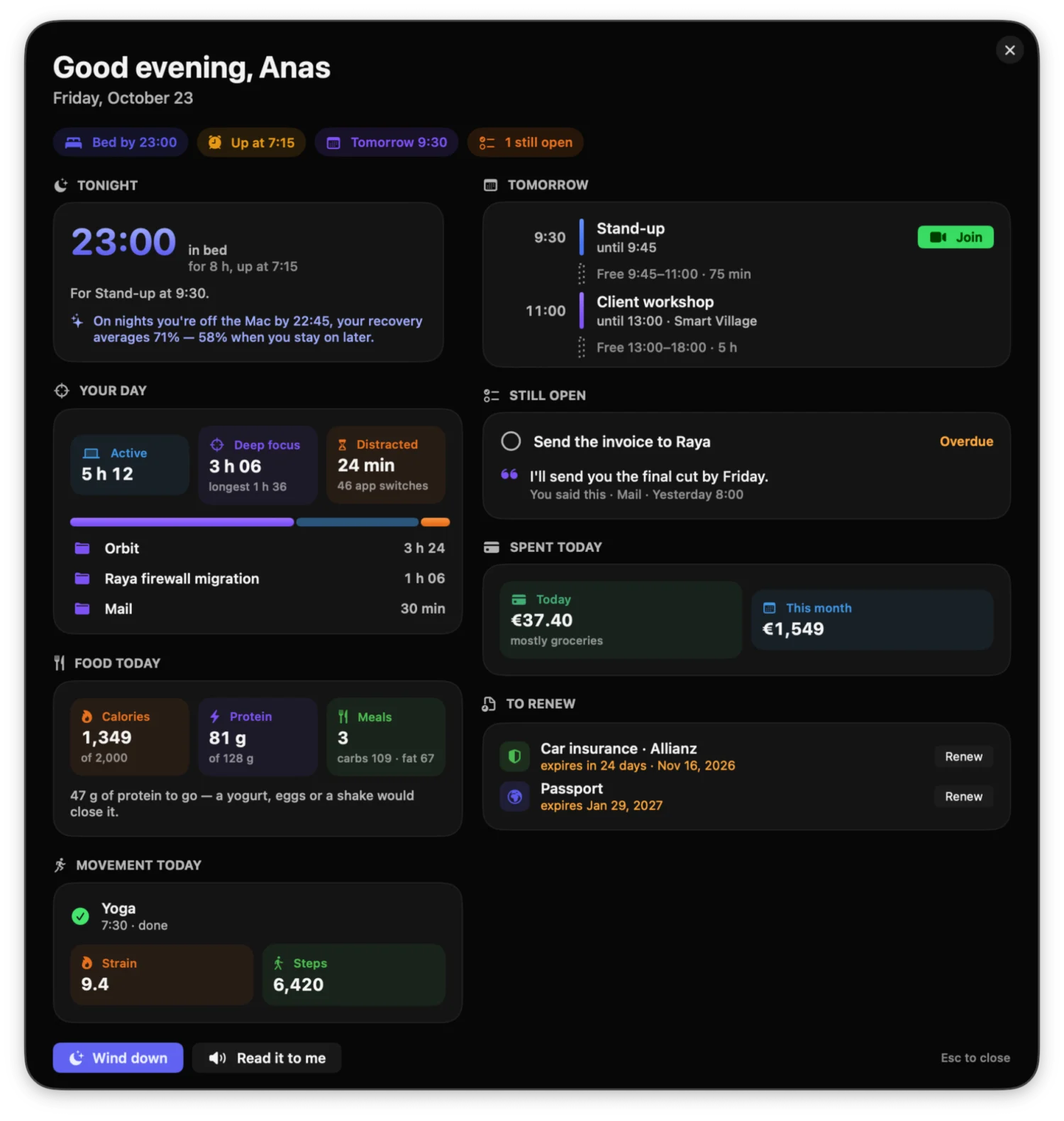
In the evening Orbix closes the day: what you got done, what's still open, tomorrow's first thing — and a bedtime that gets you the sleep the morning needs.
A bedtime that means something
From tomorrow's first meeting — or when you usually start — and half an hour more after a short night.
The day, closed
Focus and distraction, food and spending, and the things you said you'd do that are still open.
Wind down, in one click
Dark Mode, the volume down, the music paused. One Undo puts it all back.
What your nights do
“On nights you're off the Mac by 22:45, your recovery averages 71% — 58% when you stay on later.”
Get Orbix.
Press ⌥Space and ask for anything.
Free. For macOS 26 or later.